Calculate Your PayPal Fees
Selected rate: 3.49% + $0.49
For the listed U.S. presets only. With Custom rate, include any international surcharge in your own percentage.
Rates checked on September 13, 2026 against PayPal’s official U.S. merchant fee schedule (page last updated September 1, 2026).
This is an estimate, not an exact payout. It excludes currency conversion spreads, account-specific or negotiated pricing, refunds, disputes, chargebacks, and other PayPal service fees. Always confirm final totals in your PayPal account.
You finish a $500 project, send the payment request, and expect $500 to arrive. Then the processing fee appears. For a freelancer or digital creator, that difference can quietly eat into a carefully planned rate. A PayPal fee calculator helps you estimate the fee before you quote a client, sell a digital product, or issue an invoice. Enter what your customer will pay to see your likely net payout. Alternatively, enter what you need to receive and calculate a price that accounts for the fee. This guide explains both calculations with US examples and helps you choose the correct rate. Rates can change, so always compare the estimate with your own account’s applicable terms.
Quick answer: A PayPal fee calculator estimates the processing fee and the amount a seller keeps after a payment. Select your account country, payment type, currency, and whether the payment is international. Enter the customer’s payment to find your net payout, or enter your desired net amount to estimate what to charge.
Use the calculator above to switch between “Calculate my payout” and “How much should I charge?” The examples below use a US PayPal account receiving USD. If your calculator currently supports only US rates, keep its country set to US; consult the regional guide below for other markets.
How are PayPal fees calculated?
For many commercial payments, the calculation combines a percentage of the transaction with a fixed charge:
Estimated fee = payment amount × percentage rate + fixed fee
Estimated net payout = payment amount − estimated fee
The applicable percentage depends on how the customer pays. The fixed fee can depend on the currency you receive. A cross-border percentage may apply when the sender and receiver are in different markets. Some payment types use different fee structures altogether, so a single universal PayPal percentage cannot accurately describe every sale. Check the official PayPal US merchant fee schedule before relying on a preset. The US schedule was last updated September 1, 2026 when this article was checked.
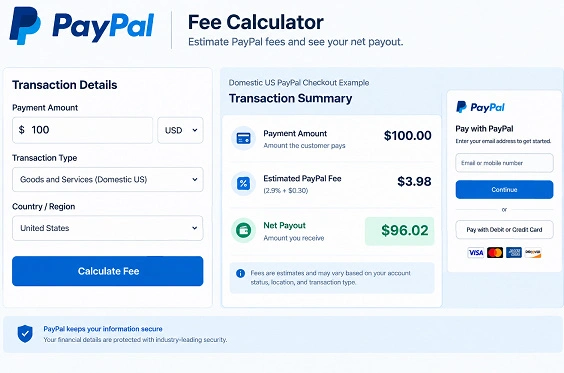
Example: What are the fees on a $100 US PayPal Checkout payment?
The published US domestic PayPal Checkout rate is 3.49% plus the applicable fixed fee. For a payment received in USD, that fixed fee is $0.49. On $100, the percentage component is $3.49; adding $0.49 makes an estimated fee of $3.98. The seller keeps $96.02, before any other applicable charges. Source: PayPal US merchant fees.
| US domestic example, USD | Published rate | Fee on $100 | Estimated amount received |
| PayPal Checkout | 3.49% + $0.49 | $3.98 | $96.02 |
| Standard credit/debit card payment | 2.99% + $0.49 | $3.48 | $96.52 |
| Send/Receive Money for Goods and Services | 2.99%, with no fixed fee listed for this payment type | $2.99 | $97.01 |
Invoicing, Pay Later, QR codes, donations, and other products may have their own rates. Compare another processor with the Stripe Fee Calculator. Source: PayPal US merchant fees.
How much should you charge to receive an exact amount?
If your client agrees that you should receive $100 after processing fees, sending a $100 payment request will fall short. For a rate made up of a percentage and fixed fee, use this reverse calculation:
Amount to charge = (desired net amount + fixed fee) ÷ (1 − percentage rate as a decimal)
For a domestic US PayPal Checkout payment in USD, that becomes ($100 + $0.49) ÷ (1 − 0.0349). The mathematical result is about $104.1239. Charge $104.13 to ensure you receive at least $100 after the estimated fee, subject to PayPal’s actual rounding and your account terms. At $104.13, 3.49% is about $3.63; adding $0.49 gives a $4.12 estimated fee and a $100.01 estimated payout. Charging $104.12 could produce an estimated payout below $100 after rounding.
For a $500 target using the same assumptions, the unrounded calculation is ($500 + $0.49) ÷ 0.9651, or about $518.5888. A $518.59 charge gives an estimated fee of $18.59 and a $500.00 payout. Check the calculator’s rounded net figure rather than assuming that adding 3.49% to your target will cover a fee charged on the larger amount.
These examples show pricing math, not a rule that every client must pay your processing fees. Agree on the invoice amount in advance and check applicable terms before adding any payment surcharge. To prepare the request, use the Freelance Invoice Generator or estimate its charges with the Payment Fee Invoice Tool.
Which fee preset should freelancers and creators use?
Begin with how the payment is processed, not the description of your work. A designer selling a template, a writer billing a client, and a creator selling a subscription can use different PayPal products even though all three are earning business income.
- Identify the seller’s PayPal account country. The seller’s local fee schedule is the starting point.
- Identify the payment flow. Was it PayPal Checkout, an eligible standard card payment, a Goods and Services send/receive transaction, or an invoice? Avoid guessing from the buyer’s card alone.
- Check the received currency. The fixed charge shown in PayPal’s schedule is generally based on the currency received.
- Check whether the sender is in another market. Apply an international fee only when the applicable schedule calls for it.
- Check for conversion or special pricing. A conversion estimate requires an actual exchange rate; negotiated rates can differ from public defaults.
A practical pricing framework: quote, collect, reconcile
Treat the calculator as a three-step pricing tool. Quote: work out your required net and calculate a payment amount before agreeing to the project; the Freelance Hourly Rate Calculator can help set your base rate. Collect: save the payment type and currency alongside the invoice. Reconcile: compare the estimate with your PayPal transaction record. If they differ, check the payment method, buyer market, and account terms.
Does an international PayPal payment cost more?
It can. Under PayPal’s US merchant schedule, receiving an international commercial transaction generally adds 1.50% to the applicable domestic commercial rate. Thus, a US seller receiving a $100 USD PayPal Checkout payment from an international buyer could estimate 3.49% + 1.50% + $0.49 = $5.48 in transaction fees, leaving $94.52. This example excludes conversion and any other applicable charges. Source: PayPal US merchant fees.
International fee and currency conversion are different questions. A buyer can be abroad while the seller receives USD; a conversion may also occur. Check PayPal’s displayed exchange rate instead of inventing a spread. For a separate transfer estimate, try the Wise Fee Calculator; it does not calculate PayPal’s conversion rate.
Are PayPal fees the same in the US, UK, Ireland, and Canada?
No. Your account’s market matters, and even within a market the transaction type and received currency can change the result. The following are illustrative published domestic commercial rates, not interchangeable calculator presets:
| Seller account market | Illustrative domestic payment type | Published rate and local-currency fixed fee |
| United States | PayPal Checkout, USD received | 3.49% + $0.49 |
| United Kingdom | All Other Commercial Transactions, GBP received | 2.9% + £0.30 |
| Ireland | All Other Commercial Transactions, EUR received | 3.40% + €0.35 |
| Canada | Commercial Transactions, CAD received | 2.90% + CAD $0.30 |
These figures come from the separate US, UK, Ireland, and Canada merchant schedules checked September 13, 2026. The UK, Irish, and Canadian schedules displayed July 15, 2026 as their last update dates. Do not assume the four rows describe identical PayPal products.
Cross-border rules also differ. For example, the UK schedule lists an additional 1.29% for commercial payments from the EEA and 1.99% from other markets, subject to its stated terms. Ireland lists no additional percentage for EEA senders, 1.29% for UK senders, and 1.99% for other markets. Canada’s commercial-transaction surcharge is 0.80% for US senders and 1.00% for other countries. Regional agreements and particular payment types can create exceptions; consult the relevant official schedule rather than putting the US international toggle on a UK, Irish, or Canadian payment. UK schedule, Ireland schedule, Canada schedule.
What can a PayPal fee calculator leave out?
A calculator can provide a useful estimate without predicting every account-level adjustment. Before you use its result for a contract or a budget, check whether your situation involves:
- Currency conversion or a different currency’s fixed fee.
- A negotiated, charity, micropayment, invoicing, QR-code, or other product-specific rate.
- A refund, dispute, chargeback, or optional service charge.
- Taxes on your sale, platform charges, or your own business expenses, which are separate from the basic transaction-fee calculation.
Your net payment is not your profit. On a $100 template sale, the $96.02 estimated payout still has to cover production, advertising, platform fees, and taxes. Keep those numbers separate with the Freelancer Take-Home Pay Calculator. If you also sell on marketplaces, calculate their separate deductions with the Upwork Net Payout Calculator or Fiverr Seller Profit Calculator.
Key takeaways
- Choose the correct account market, payment type, and received currency before entering an amount.
- For a $100 domestic US PayPal Checkout payment received in USD, the published rate yields an estimated $3.98 fee and $96.02 payout.
- Use reverse calculation when you need to receive a target amount; round the amount to charge up if necessary and verify the resulting net.
- An international transaction fee is distinct from any currency-conversion cost.
- Recheck PayPal’s official fee schedule when rates change or your observed fee differs from your estimate.
Frequently asked questions
How much does PayPal charge for a $100 payment?
It depends on the payment type, market, and currency. For a domestic US PayPal Checkout payment received in USD, the published 3.49% plus $0.49 rate produces an estimated $3.98 fee. A different flow can produce a different amount. Source: PayPal US merchant fees.
How much should I charge to receive $100 through PayPal?
For a domestic US PayPal Checkout transaction received in USD, $104.13 is an illustrative amount to charge for an estimated payout of at least $100. Enter your own payment type and target in reverse mode before invoicing.
Is the PayPal fixed fee always $0.49?
No. The US schedule lists $0.49 as the fixed fee for commercial transactions received in USD, but fixed charges vary by received currency and payment product. Its Goods and Services send/receive row lists a percentage without a fixed fee. Source: PayPal US merchant fees.
Who pays the PayPal seller fee?
The commercial transaction fee is generally deducted from the payment the seller receives. If you want your pricing to account for that expense, agree on your quoted price before requesting payment; do not assume you can add a separate surcharge in every situation.
Are international fees the same as currency-conversion fees?
No. A cross-border transaction can have an additional merchant transaction percentage, while conversion relates to exchanging one currency for another. A calculator showing transaction fees alone cannot promise the final converted payout.
Can I use US rates for a UK, Irish, or Canadian account?
No. Each market publishes its own merchant schedule. Select a verified local preset if the calculator offers one; otherwise, enter your applicable rate as a custom estimate and consult PayPal’s regional fee page.
Why does my actual PayPal fee differ from the estimate?
Check whether the actual payment used a different product, currency, buyer market, or account-specific rate. Also inspect conversion and any separate adjustments. Use the completed transaction’s fee detail to reconcile the difference.
Image SEO details
Image 1 — Filename: paypal-fee-calculator-net-payout-example.webp
Alt text: PayPal fee calculator showing a $100 payment, $3.98 estimated fee, and $96.02 net payout
Caption: A domestic US PayPal Checkout example shows the payment, estimated fee, and seller payout.
Description: Original screenshot or illustration of the calculator’s US domestic PayPal Checkout result; insert beside the $100 example. Match the image to the published tool’s actual interface.
Image 2 — Filename: paypal-reverse-fee-calculation-example.webp
Alt text: Reverse PayPal fee calculation showing the amount to charge to receive $100
Caption: Reverse mode helps sellers set a payment amount that meets their target net payout.
Description: Original illustration of the desired-net-to-customer-charge calculation; insert beside the reverse-calculation section. Show the actual calculated figures.
Suggested authoritative external links
- PayPal US merchant fees — cite next to US rates and examples.
- PayPal UK merchant fees — cite in the regional section.
- PayPal Canada merchant fees — cite in the regional section. The Ireland merchant fee schedule is also linked where Irish figures appear.